
Workspaces
A workspace is a tab for one idea: its own folder, its own git repository, and one or two AI assistants that know what they’re working on.
Opening one, start to finish
Section titled “Opening one, start to finish”An idea comes up while you’re looking at NOTES: you press i (idea), write
it, done – it’s a note, nothing more yet. Later you decide it’s worth its
own tab: pick it, press w. Phosphor shows you the note (title, kind,
author, date) and asks if that’s the one, then:
- creates
[deck] projects(default~/projects)/NAME,NAMEfrom the note’s title; - copies the note into
BRIEF.md, and adds a line to the note itself saying where it went; - writes an
AGENTS.mdper assistant (see below) and an emptyNOTES.md; - asks what shape the tab is (see the table), then adds it to your profile and opens it.
The same thing, without a note: the tab bar’s + → workspace, or
phosphor workspace new NAME from a shell.
| shape | the tab |
|---|---|
| one | one assistant in the workspace folder |
| two | two assistants side by side, each in its own part (frontend/, backend/ or any two names) |
| shell | an assistant and a shell next to it |
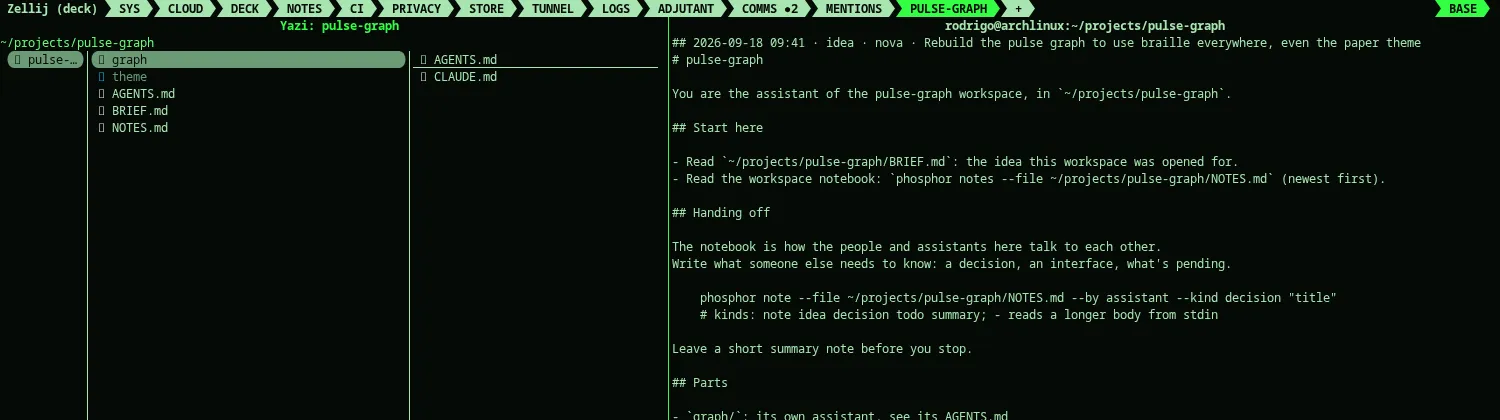
The tab is kept in your profile like any other, so it comes back after
phosphor restart. What “comes back” means depends on the assistant:
claude resumes its last conversation there (claude --continue, or a
fresh one if there wasn’t one yet); every other assistant (gemini, codex,
opencode) just starts over – there’s no --continue for them yet, so
whatever context it had lives only in that session and in what got written
to the notebook before it ended.
The first time a pane starts, that assistant is asked to read its own
AGENTS.md and BRIEF.md and say where things stand – so arriving at a
workspace you didn’t just create still tells you something.
What’s in the folder
Section titled “What’s in the folder”| file | what |
|---|---|
| AGENTS.md | who this assistant is, which folder it owns, how to hand off |
| CLAUDE.md / GEMINI.md | @AGENTS.md, for the assistants that read their own file |
| BRIEF.md | the note the workspace was opened from (if any) |
| NOTES.md | the workspace’s own notebook |
Nothing that already exists is overwritten: phosphor workspace new on a
folder you have adds only the missing files, and says which ones it left alone.
Two notebooks, not one
Section titled “Two notebooks, not one”Easy to mix up, so worth saying plainly: Alt-j, anywhere in the deck
(workspace tab included), writes to your notebook – the one phosphor notes shows, tagged with whatever tab you were in. It’s yours, for you.
The workspace’s own NOTES.md is a different file, and nothing writes to
it automatically. It’s how the assistants – and you, if you want in on it
– hand work to each other on purpose:
phosphor note --file ~/projects/NAME/NOTES.md --by backend --kind decision "the API returns JSON"phosphor notes --file ~/projects/NAME/NOTES.mdEvery workspace AGENTS.md tells its assistant this same command, so it
knows to leave a note before it stops rather than let context evaporate
when the pane restarts. Nobody types into another assistant’s pane –
the notebook is the only channel between them.
Commands
Section titled “Commands”phosphor workspace new [NAME] [--shape one|two|shell] [--parts "a b"] [--assistant claude|gemini|codex|opencode][--brief FILE | --note TEXT] [--folder-only]—--notetakes the note whose title contains TEXT;--folder-onlywrites the folder and leaves the profile and tabs alone (an assistant can use it).phosphor workspace open NAME— go to its tab, or open it (inside the deck).phosphor workspace list— the workspaces in your projects folder.